訂購教學 How to place an order

第一步:瀏覽及選擇產品
Step 1: Browse and Select Products
進入 商店 或 產品 頁面。
Go to the Shop or Products page.
使用搜尋欄或產品類別尋找所需產品。
Use the search bar or Product Category to find items.
點擊產品查看詳情,然後點擊 加入購物車。
Click on the product to view details, then click Add to Cart.
第二步:查看購物車
Step 2: Review Your Cart
點擊右上角的 購物車 圖示。
Click the Cart icon (🛒) at the top right.
確認數量及金額是否正確。
Check quantities and prices.
點擊 前往結帳。
Click Proceed to Checkout.
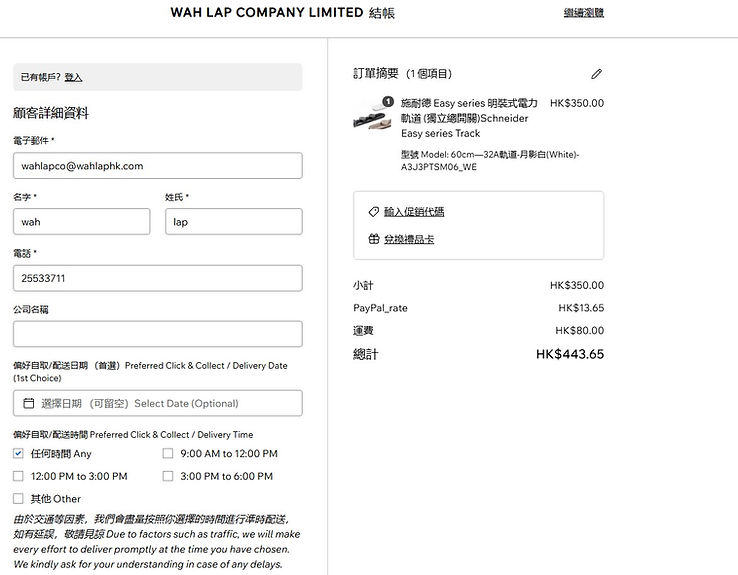
第三步:填寫運送及聯絡資料
Step 3: Shipping & Contact Information
登入帳戶或註冊新帳戶。
Log in or create an account.
填寫運送地址、電話及電郵。
Enter your shipping address, phone number, and email.
香港客戶可選擇本地送貨或自取。
Hong Kong customers can select local delivery or self-pickup.
送貨服務到偏遠地區(需另收取附加費)
We deliver goods to remote areas (Additional charges are required)
偏遠地區 (A區)
⚫大潭區域、東涌、機場、清水灣、葵涌貨櫃碼頭、西貢(西貢市中心除外)及沙頭角 --> HKD$100
Remote areas (Area A):
⚫ Tai Tam Area, Tung Chung, Airport, Clear Water Bay, Kwai Chung Terminal, Sai Kung (excluding Sai Kung town centre) and Sha Tau Kok --> HKD$100
偏遠地區 (B區) <-- (*必須先以信用卡, 銀行轉賬及Payme付款)
⚫馬灣、愉景灣、大澳、梅窩及南大嶼山其他區域、長洲、坪洲、喜靈洲及南丫島 --> HKD$150
Remote areas (Area B) : (* Please pay with Credit Card, Bank Transfer or Payme in advance)
⚫ Ma Wan, Discovery Bay, Tai O, Mui Wo and all areas in Lantau Island (South), Cheung Chau, Peng Chau, Hei Ling Chau and Lamma Island --> HKD$150
第四步:選擇付款方式
Step 4: Choose Payment Method
選擇付款方式:
Select your preferred payment method:
- PayPal (PayPal提供VISA, MasterCard 和 American Express 付費服務。敬請注意,我們將額外收取總金額約 3.9% 之手續費,以支付 PayPal 交易所需費用。
PayPal (PayPal offers VISA, MasterCard and American Express payment. Please be advised that an additional service fee of approximately 3.9% of the total amount will be charged to cover PayPal transaction fees.)
- 銀行轉帳 (轉數快) Bank Transfer Bank Transfer (FPS)
- 香港政府採購卡 HKSAR Government Purchasing-Card
- 八達通 Octopus Card
- Payme
- 支付寶 Alipay
Review the order total (including shipping fee).
確認訂單總金額(含運費)。
第五步:確認並下訂單
Step 5: Confirm and Place Order
再次檢查所有資料。
Double-check all information.
點擊 確認下單。
Click Place Order / Confirm Purchase.
✅訂單已完成!
Order Completed!
您會即時收到訂單確認電郵,內含訂單編號。
You will receive an order confirmation email immediately with your order number.